Everyday
How to Convert Hours and Minutes to Decimal Hours
By the CalculatorVerse team ·
To convert hours and minutes to decimal hours, divide the minutes by 60 and add the result to the whole hours. So 7 hours 45 minutes is 7 + 45 ÷ 60 = 7.75 hours, and 8 hours 20 minutes is 8 + 20 ÷ 60 = about 8.33 hours.
Decimal hours are the format payroll and invoicing use, because you can multiply them by an hourly rate. A clock shows 7:45, but 7.45 hours would be wrong: in decimal, 7.45 hours is only 7 hours 27 minutes. This guide gives the formula, a minutes-to-decimal chart, timesheet examples, how to convert back, and the mistakes that cost people pay.
What are decimal hours?
Decimal hours express a length of time as a single number of hours, with the minutes written as a fraction of an hour. Half an hour is 0.5, a quarter of an hour is 0.25, and so on.
A clock counts in base 60: 60 minutes make an hour. Ordinary numbers count in base 10. Decimal hours translate the first into the second, so the time can go straight into a sum. That is why timesheets, payroll systems, invoices for hourly work and project trackers usually ask for decimal hours rather than hours and minutes.
How do you convert hours and minutes to decimal?
Use this formula:
Decimal hours = hours + minutes ÷ 60
Step by step:
- Keep the whole hours as they are.
- Divide the minutes by 60.
- Add the two together.
- If you also have seconds, divide them by 3,600 and add those too.
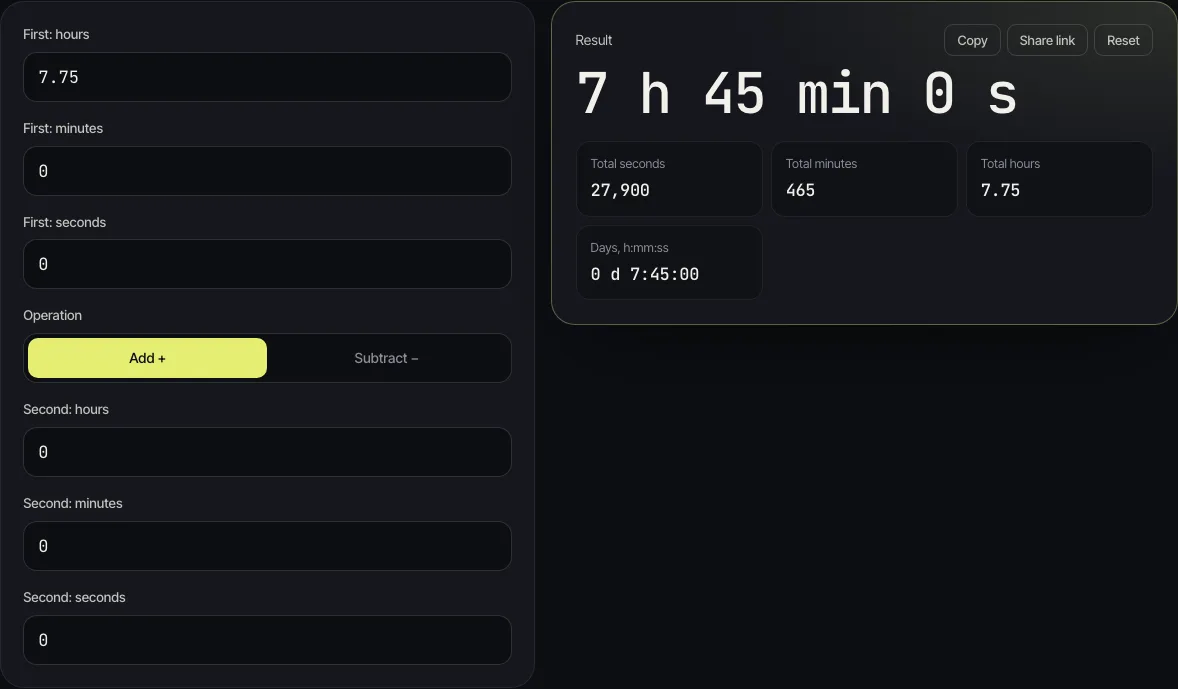
For 7 hours 45 minutes: 45 ÷ 60 = 0.75, so the answer is 7.75 hours. For 20 minutes on its own: 20 ÷ 60 = 0.3333…, so a 20-minute job is a third of an hour, about 0.33.
To check a conversion, open the time calculator, type the hours and minutes into “First: hours” and “First: minutes”, leave the second time at zero, and read “Total hours”. It also works the other way: type a decimal such as 7.75 into “First: hours” and the result shows 7 h 45 min.
Minutes to decimal hours chart
Each row below is the time calculator's “Total hours” for that many minutes, rounded to four decimal places where the decimal repeats.
| Minutes | Decimal hours | Minutes | Decimal hours |
|---|---|---|---|
| 1 | 0.0167 | 25 | 0.4167 |
| 5 | 0.0833 | 30 | 0.5 |
| 6 | 0.1 | 35 | 0.5833 |
| 10 | 0.1667 | 40 | 0.6667 |
| 12 | 0.2 | 45 | 0.75 |
| 15 | 0.25 | 50 | 0.8333 |
| 20 | 0.3333 | 55 | 0.9167 |
Only some minute values come out as short, exact decimals: 6, 12, 15, 30 and 45 among them. Others, like 5, 10, 20 and 25, repeat forever, so you will see them rounded. Two decimal places (0.08, 0.17, 0.33, 0.42) is what most timesheets show; keep more if the hours will be multiplied by a large rate.
How do you calculate decimal hours from a start and end time?
When you have clock times rather than a length of time, subtract the start from the end, take off any unpaid break, then convert.
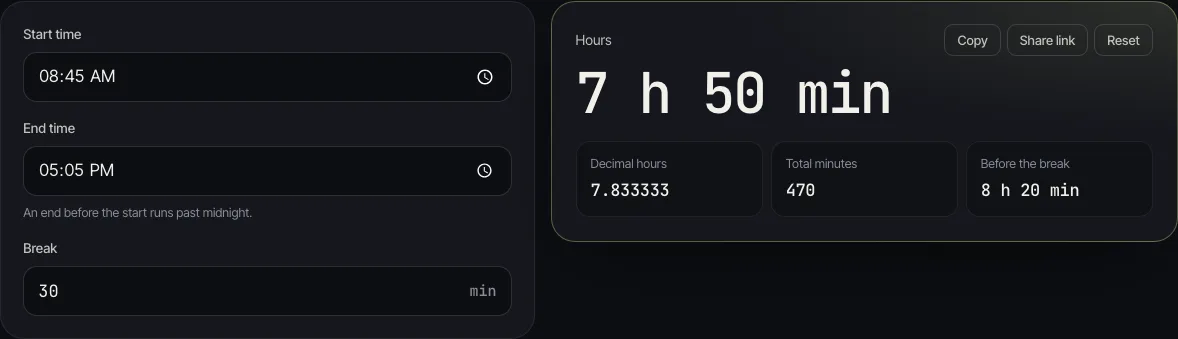
Say a shift runs from 08:45 to 17:05 with a 30-minute unpaid break. From 08:45 to 17:05 is 8 hours 20 minutes. Less the 30-minute break, that is 7 hours 50 minutes, and 50 ÷ 60 makes it 7.83 decimal hours (7.833333 to six places).
The hours calculator does all three steps: enter the “Start time”, the “End time” and the “Break” in minutes, and it shows the hours and minutes, the decimal hours and the total minutes. A shift that ends after midnight works too. From 22:00 to 06:15 with no break is 8 h 15 min, or 8.25 decimal hours.
How do you add up a week of hours for payroll?
Work out each day in hours and minutes, add the minutes up, and convert the total once at the end. Rounding every day first can drift the week's total, and the error grows with the number of entries.
Here is a five-day week, entered in the time card calculator with an hourly rate of 18:
| Day | Start | End | Break | Worked |
|---|---|---|---|---|
| Mon | 09:00 | 17:20 | 30 min | 7 h 50 min |
| Tue | 08:45 | 17:30 | 45 min | 8 h 00 min |
| Wed | 09:10 | 18:00 | 30 min | 8 h 20 min |
| Thu | 09:00 | 17:30 | 30 min | 8 h 00 min |
| Fri | 09:00 | 15:15 | 15 min | 6 h 00 min |
The week totals 38 h 10 min. In decimal that is 38.17 hours (38.166667 to six places), and at 18 an hour the calculator gives gross pay of 687.
Now the common mistake: reading 38 h 10 min as 38.10 hours. At the same rate that pays 685.80, which is 1.20 short. It looks small, but it repeats every week, on every timesheet where the minutes were typed as if they were decimals.
How do you convert decimal hours back to hours and minutes?
Keep the whole number as the hours, then multiply the part after the decimal point by 60 to get the minutes. If the minutes have a decimal part too, multiply that by 60 for the seconds.
- 7.75 hours: 0.75 × 60 = 45, so 7 h 45 min.
- 7.3 hours: 0.3 × 60 = 18, so 7 h 18 min, not 7 h 30 min.
- 1.2857142857 hours: 1 h 17 min 8.571 s.
- 0.427111 hours: 25 min 37.6 s.
The last two are the kind of long decimals a spreadsheet or a division leaves behind. Typing them into “First: hours” in the time calculator turns them back into hours, minutes and seconds in one step.
How do you convert time to decimal hours in Excel?
Excel stores a time as a fraction of a day, so 18:00 is 0.75 of a day. Multiplying by 24 turns it into hours. If cell A2 holds 7:45, this formula returns 7.75:
=A2*24
Format the result cell as Number or General, not Time; otherwise Excel shows the answer as a clock time. Microsoft's own Q&A forum gives the same method.
Can an employer round time to the nearest quarter hour?
In the US, federal rules accept rounding clock-in and clock-out times to the nearest 5 minutes, tenth of an hour or quarter of an hour, but only if it does not, over time, leave employees paid for less than they worked. That is in 29 CFR 785.48(b), which says the practice is accepted “provided that it is used in such a manner that it will not result, over a period of time, in failure to compensate the employees properly for all the time they have actually worked.”
This is why a tenth of an hour (6 minutes) and a quarter of an hour (15 minutes) are common units on time clocks: both are exact decimals, 0.1 and 0.25. Rules in other countries, and some US states, differ. If you are setting a rounding policy for staff, check the rules where you are or ask an employment adviser. For your own timesheet, the safest habit is to record the real minutes and let the conversion do the rest.
Common mistakes with decimal hours
- Writing minutes after the point. 8 h 30 min is 8.5, not 8.30. 8.30 hours is 8 h 18 min.
- Dividing by 100. Minutes are sixtieths of an hour, not hundredths. 45 minutes is 0.75, not 0.45.
- Rounding each day. Rounding 20 minutes to 0.3 every day loses 2 minutes a day. Add the minutes up, then convert.
- Forgetting the break. Take unpaid breaks off before converting, or the decimal hours will be too high.
- Shifts past midnight. 22:00 to 06:15 is 8 h 15 min, not a negative number. Count through midnight, as the hours calculator does.
Questions people ask
How do I convert minutes to decimal hours?
Divide the minutes by 60. 45 minutes is 45 ÷ 60 = 0.75 hours, and 20 minutes is about 0.33 hours.
What is 7 hours and 30 minutes in decimal?
7.5 hours, because 30 minutes is half of an hour. It is not 7.30: 7.30 decimal hours is 7 hours 18 minutes.
How many decimal hours is 15 minutes?
0.25 hours. Quarter-hour steps are 0.25, 0.5 and 0.75.
How do I convert decimal hours back to hours and minutes?
Keep the whole hours and multiply the decimal part by 60. 8.25 hours is 8 hours plus 0.25 × 60 = 15 minutes.
How many decimal places should I use on a timesheet?
Two is common (0.33 for 20 minutes). Keep more if you multiply the hours by a high rate, and add up the minutes before converting so the rounding happens only once.
Why does my payroll use decimal hours instead of hours and minutes?
Because pay is hours × rate, and you can only multiply a single number. 38 h 10 min has to become 38.17 hours before it can be multiplied by an hourly rate.