Math
How to Calculate the Percent Variance Between Two Numbers
By the CalculatorVerse team ·
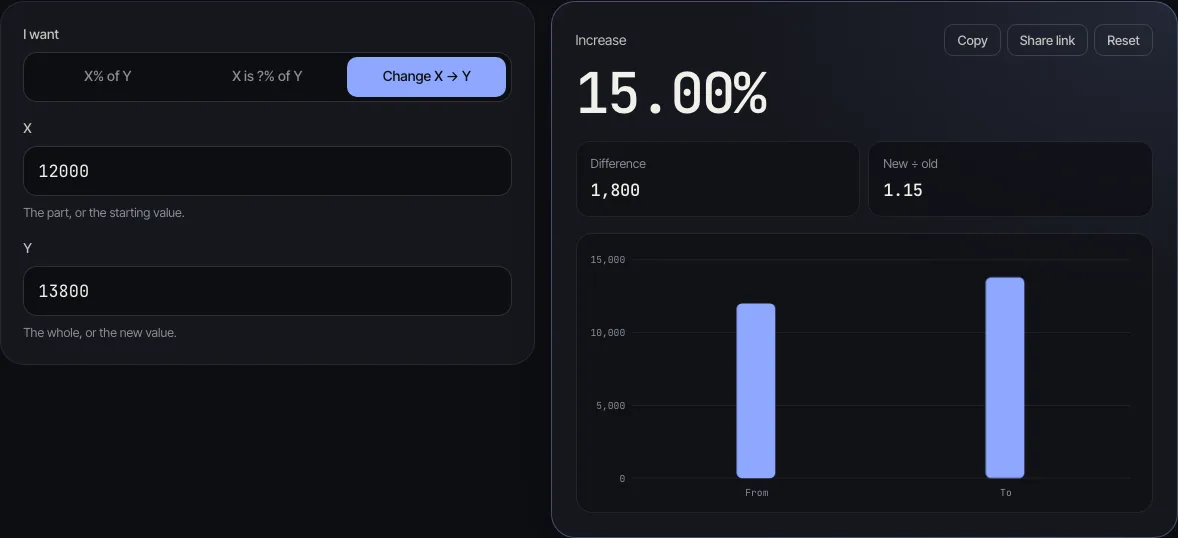
To calculate the percent variance between two numbers, subtract the original (or budgeted) value from the new (or actual) value, divide the result by the original value, and multiply by 100. If a budget was 12,000 and you spent 13,800, the variance is 1,800, and 1,800 ÷ 12,000 × 100 = 15% over budget.
Percent variance is the same calculation as a percentage change. Finance teams say "variance" when they compare actual figures with a budget or forecast. This guide covers the formula, worked examples with real numbers, what to do with negative or zero starting values, the spreadsheet formula, and why it is a different thing from the variance in statistics.
What is percent variance?
Percent variance is the difference between two values expressed as a percentage of the first one. It answers the question "by what percentage did this move away from where it started, or from what we planned?"
You will see it called several names that all mean the same calculation:
- percent change or percentage change, the general maths term;
- budget variance % or variance to budget, in finance and accounting;
- forecast variance %, when the original value is a forecast;
- year-over-year (YoY) change, when the two values are the same period in different years.
The one thing that sets it apart from a plain difference is the base. A difference of 1,800 means a lot on a budget of 12,000 and very little on a budget of 1,200,000. Dividing by the original value puts both on the same scale.
How do you calculate percent variance?
Use this formula:
Percent variance = (new − original) ÷ |original| × 100
The bars around the original value mean "the absolute value": ignore its minus sign if it has one. That keeps the direction of the result correct when the starting value is negative (there is an example below).
Step by step:
- Decide which number is the original. In a budget comparison it is the budget; over time it is the earlier figure.
- Subtract the original from the new value. This is the variance in units (pounds, dollars, items).
- Divide that difference by the original value, ignoring its sign.
- Multiply by 100 and add a % sign.
- Read the sign: positive means up (or over budget), negative means down (or under budget).
You can check any pair of numbers with the percentage calculator: choose "Change X → Y", type the original value as X and the new value as Y, and it shows the percentage, the difference and the working line by line.
Worked examples of percent variance
Each row below was run through the percentage calculator, so the numbers match what you will see when you try them.
| Situation | Original | New | Difference | Percent variance |
|---|---|---|---|---|
| Spending vs budget | 12,000 | 13,800 | +1,800 | +15% (over budget) |
| Monthly sales | 2,500 | 2,150 | −350 | −14% |
| Price rise | 40 | 50 | +10 | +25% |
| Price fall | 50 | 40 | −10 | −20% |
| Loss to profit | −200 | 100 | +300 | +150% |
Look at the third and fourth rows. The same gap of 10 is +25% on the way up and −20% on the way down, because the base is 40 in one case and 50 in the other. This is also why a 50% rise followed by a 50% fall does not bring you back to where you started.
The last row shows why the formula divides by the absolute value. Moving from a loss of 200 to a profit of 100 is an improvement of 300. Dividing 300 by 200 (not by −200) gives +150%, an increase, which is the right direction.
Is percent variance the same as variance in statistics?
No. They share a word and nothing else. In statistics, the variance of a set of numbers is the average squared distance of each number from the mean. The NIST/SEMATECH e-Handbook of Statistical Methods defines the sample variance as the sum of (Y − mean)² divided by N − 1, and the standard deviation as its square root.
Take the same two numbers, 40 and 50. Their percent variance is +25% (from 40 to 50). Their sample variance is 50, in squared units, with a mean of 45 and a standard deviation of about 7.07. One describes a change between two values; the other describes how spread out a group of values is.
If you want to measure spread, for example how much monthly sales bounce around, use the variance calculator. If you want to compare an actual figure with a plan or an earlier figure, you want percent variance.
Percent variance vs percentage difference
Percentage difference is a third measure, used when neither number is the "original", such as two quotes for the same job or two lab measurements. It divides the gap by the average of the two numbers and ignores direction:
Percentage difference = |a − b| ÷ ((a + b) ÷ 2) × 100
For 40 and 50 the gap is 10 and the average is 45 (the average calculator gives the same), so the percentage difference is 10 ÷ 45 × 100 ≈ 22.2%. That sits between the +25% and −20% percent variances, and it is the same whichever number you put first.
Use percent variance when there is a clear before and after, or a plan and an actual. Use percentage difference when the two numbers are equals.
How do you calculate percent variance in Excel or Google Sheets?
Put the original value in column A and the new value in column B, then in C2 type:
=(B2-A2)/ABS(A2)
Format the cell as a percentage (Format → Number → Percent in Google Sheets, or the % button on Excel's Home tab). Do not also multiply by 100, or 15% will show as 1500%.
If some original values are zero, wrap the formula so it does not show a divide-by-zero error:
=IF(A2=0, "n/a", (B2-A2)/ABS(A2))
Both formulas use only the standard ABS and IF functions, so they work the same in Excel, Google Sheets, LibreOffice Calc and Apple Numbers.
What if the original value is zero?
Percent variance from zero is undefined, because you cannot divide by zero. Going from 0 to 5 is an increase, but no percentage describes it. The percentage calculator says so instead of showing a misleading number: "The starting value can't be zero for a percentage change."
In a report, write the change in units instead (+5) or mark it "new" or "n/a".
Common mistakes
- Dividing by the new value. 1,800 ÷ 13,800 is about 13%, not the 15% the budget comparison calls for. The base is always the original or planned value.
- Mixing up percent and percentage points. An interest rate rising from 4% to 5% is a rise of 1 percentage point, but a 25% increase in the rate. Say which one you mean.
- Averaging percentages. If one product is +10% and another −10%, the total is not 0% unless both had the same original value. Add up the units first, then work out the percent variance of the totals.
- Ignoring the sign of a negative base. Without the absolute value, −200 to 100 comes out as −150%, which reads as a fall.
- Reading the sign as good or bad. +15% is good news for revenue and bad news for costs. Many teams label variances "favourable" or "unfavourable" as well as giving the sign.
Questions people ask
What is the formula for percent variance?
Percent variance = (new value − original value) ÷ |original value| × 100. The original is the budget, forecast or earlier figure you are comparing against.
How do I calculate the variance between two numbers as a percentage?
Subtract the first number from the second, divide by the first number, and multiply by 100. From 2,500 to 2,150 is −350 ÷ 2,500 × 100 = −14%.
Is a negative percent variance bad?
Not necessarily. A negative variance means the actual figure is below the original or the budget: bad for sales, but good for costs. Judge it by what the number measures.
Why is 40 to 50 a 25% increase but 50 to 40 only a 20% decrease?
Because each percentage is measured against its own starting value. 10 is a quarter of 40 but only a fifth of 50.
What is the difference between percent variance and percentage difference?
Percent variance compares a new value with an original one and keeps the direction. Percentage difference compares two equal partners by dividing the gap by their average, so 40 and 50 give about 22.2% either way round.
Can percent variance be more than 100%?
Yes. Any new value more than double the original gives a variance above 100%. From 12,000 to 30,000 would be +150%. A decrease, though, can never go below −100% unless the new value is negative.